GenKI4Media: How to Run A Successful Journo Tech Workshop
,We've become pros at applying R&D methods and techniques in the last couple of years. These days our projects are organized in a sustainable fashion, our routine work has become more efficient, and – if you can believe it – the in-person meetings are both fun and productive. This calls for a new best practice post, which will focus on a "GenAI meets journalism" workshop we had in Berlin last November.
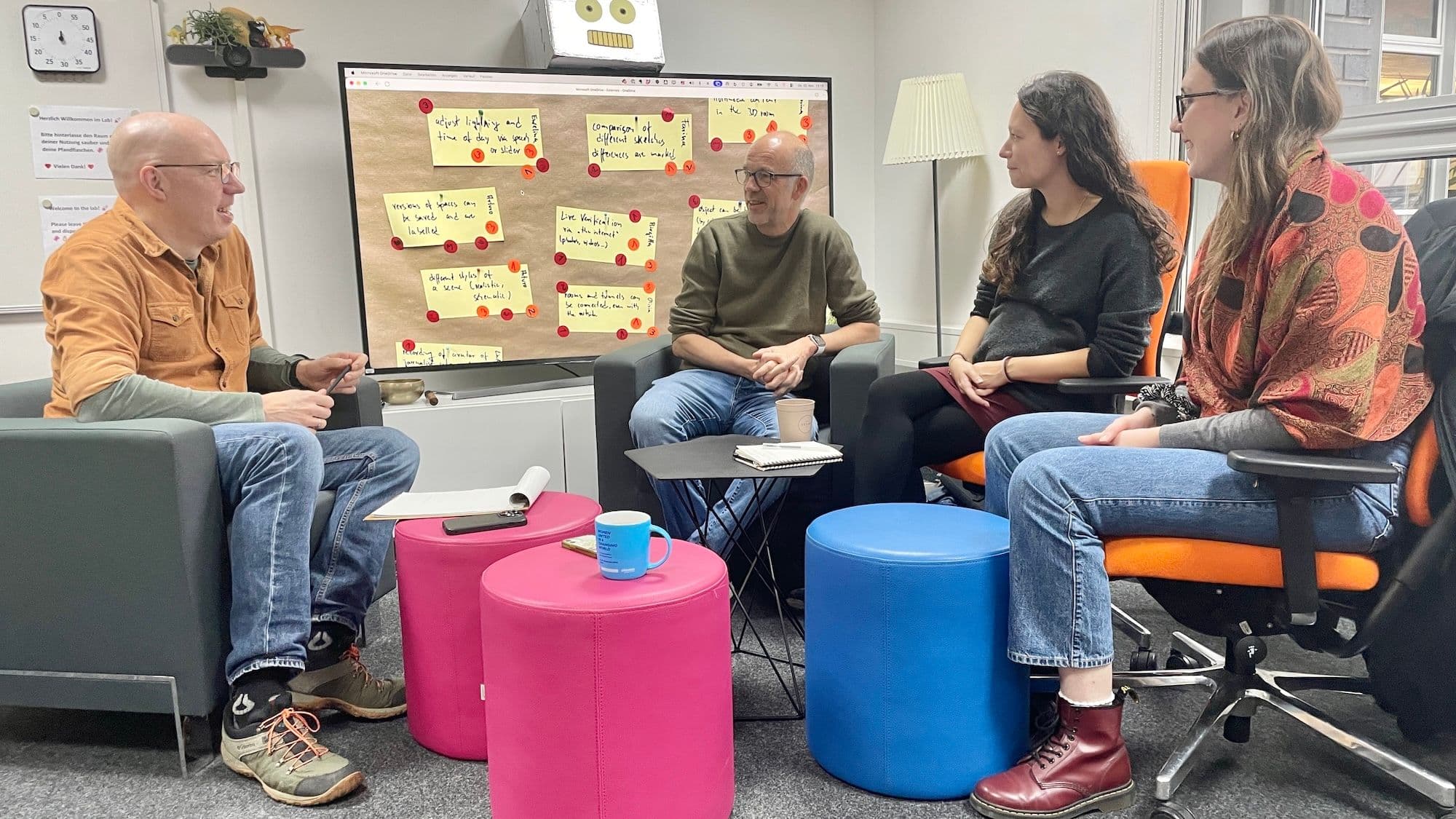
As our role as co-manager of three use cases in GenKI4Media became clearer and more demanding, the ReCos assigned to the project decided to get together for a comprehensive, two-day ideation and requirements session at DW's Berlin HQ. It went really well, in the sense that it wasn't just a pleasant meeting, but also one that gave us a clear vision of the pilots/prototypes, and a roadmap for the next couple of months.
We'll take a closer look at one of the GenKI media use cases later, but our first focus is going to be the meeting itself. Or more precisely: the building blocks that made it such a good experience.
So what was our approach? Basically, there are five things we wanted to get right.
Building Blocks
1) The Schedule
We planned the workshop well in advance. And we made sure that as many GenKI team members as possible could attend. We asked everybody to come to Berlin in person, arrive on the day before the first morning session, stay for at least two nights, and have joint meals. There was also a nice selection of snacks and drinks. That way, we could work together for almost two full days – and nobody was stressed out due to lack of sleep, long train rides, or low blood sugar levels.
2) The Venue and the Equipment
To make the meeting even more comfortable (and thus more productive), we booked a nice room for 48 hours: the DW lab. It's spacious, bright, and comfortable – and it has all the chairs, tables, computers, screens, gadgets, and workshop items a dedicated R&D team needs. Note that we frequently and seamlessly switched from analog material (e.g. post-its) to digital workflows (interactive diagrams on a wall-mounted hi-res TV) to keep things fresh, interesting, and as convenient as possible.
3) Facilitation Methods
Teams work (a lot) better if individual members know what makes their colleagues tick. How do people like to communicate? What are their unique skills? What do their workflows look like? There's tons of stuff to know, and most people really appreciate it when you ask them how they want to be treated and what they can bring to the table. Therefore, we handed out sheets with "personal washing instructions" and had a quick, enlightening group discussion about the topic. Right after, we explored team work, talents, and roles via a Lego Serious Play session (talk about building blocks!). How do individuals fare as architects, construction managers, or builders? The insights were remarkable and revealing in terms of team dynamics. Having a certified facilitator among our colleagues proved especially beneficial.
4) Communication
Team communication can be permissive but regulated at the same time; that's not a contradiction. If you have an important question or idea, by all means, go ahead and present it. However, try not to trail off too much. To address the challenge of having a relaxed, but also time-boxed conversation, we introduced Hello Agile's ELMO and OSCAR cards. Yes, we're talking about the Muppet characters, but in this case, their names are also acronyms: ELMO is short for: "Enough, let's move on" (a polite, first strike), and OSCAR means: "Okay stop, cancel and resume!" (a more assertive way of saying that a debate has lost its course). The cards worked really well for us. Actually, we barely had to use them: just hinting at the possibility of showing someone an ELMO was enough to get back on track most of the time.

5) Stakeholder Focus
R&D professionals should always be in touch with stakeholders outside of their immediate team, i.e.: potential users of the product/service they're building, representatives of the wider R&D consortium (at different organisations and institutions), and other key stakeholders. In our case that meant meeting with DW's investigative unit, developers/technical integrators at art+com, and media/tech academia from the the University of Applied Sciences Mittweida. If you want a clear idea of how AI-driven 3D reconstruction can be useful in investigative reporting (e.g. when trying to recreate a crime scene), ask a seasoned journalist. For deeper insights on frontend/backend engineering and APIs, talk to a tech expert. And don't forget to consult a media/tech professor; they're likely to know a great deal about similar projects, common challenges, and state-of-the-art concepts.
The Tool Of Our Dreams
This is not the time or place to do a deep dive into requirements lists and prototype sketches. Nevertheless, we'd love to document at least some of the ideas we came up with as a diverse, cross-functional workshop team.
The following list of fundamental features refers to the GenKI4Media 3D reconstruction use case. It's about transforming text, photos or AV content into virtual models of real spaces that can't be accessed, but need to be visualized. Think of an investigative journalist looking at satellite images to locate a secret prison – and later on interviewing an eyewitness who describes one of the cells in detail. There would be no footage of that room, so we'd recreate it in 3D.
Here's what our AI service for 3D investigations should probably offer:
A secure environment. The tool needs to store and process data in a place where only trusted team members can access it. This is crucial, as the information is highly sensitive and lives may be at stake.
Guided reconstruction. The tool should ask specific questions about the 3D reconstructions – and offer a set of basic templates (rooms, buildings, courtyards etc.); many cases are similar, and there's no need to start from scratch every time.
2D to 3D. In a first step, the tool should help users sketch a 2D layout of a space (based on maps, interviews, photos, quick annotations, "x marks the spot") which will later be transformed into a 3D model.
Manual editing. As AI tools make a lot of mistakes and are bad at creating a convincing virtual world in one go, there has to be a way of fine-tuning things. For example, users should be able to edit, move or delete single objects. Ideally, editing processes should be multimodal (i.e. users can type, click, talk to the system or interact via gestures while immersed in a scene).

Multimedia content. To make a scenario as interesting, authentic, and compelling as possible, users should be allowed to place all kinds of multimedia content: explainer texts, images, audio files, short videos – which could all be attached to certain objects and storylines.
Incidence of light. As users will have to tell stories across time – space in summer, rooms at night – the 3D editor needs a state-of-the-art lighting feature.
Change of perspectives. Visualizing one eye witness account is already interesting. However, a properly built 3D space should also give journalists the option to show different events from different perspectives: For instance, what did the prison guard see? Where did he go? What about other witnesses? What did the scene look like from above? The tool thus needs a toggle PoV feature, which should also take into account different body heights and chase cam options.
Story points and paths. Users should be able to define different ways of telling the story. For a short video report, it may be enough to introduce the main characters and one building. For a deeper, more immersive experience, it's probably important to show more avatars, objects, and spaces in more detail – and highlight the paths connecting them.
Synthetic voices. AI narration would come in handy for two reasons: First of all, it's a great way to anonymize original content (and thus protect witnesses). Secondly, it can be used to provide more context and/or describe scenes in great detail (based on research, off-screen voice documentary-style).
Different output options. 3D spaces and interactive scenarios are fascinating, but most media orgs circulate most of their content in the form of web videos these days. So the tool probably needs a practical "flattie" output option as well (e.g. vertical video for YouTube).
ChatGPT Can't Do This
The list goes on and has also been refined since we met in Berlin – but we'll just stop here. The point is clear: We had a very good exchange and recorded a ton of ideas regarding Gen AI, 3D models, and investigative journalism.
We also had this final thought at the workshop, one that may be particularly relevant in this day and age: While we embrace technology and are all for experimenting with AI tools, we're pretty sure that ChatGPT (or Claude or Mistral) couldn't have done the job in this case. We got really good results thanks to human collaboration.